
How to Use Instagram Stories: Answers to 14 Tricky Questions
Read the basics of using Instagram Stories and then move on to Instagram Stories tips and tricks that will help you stand out from the crowd.

Contents
What are Instagram Stories?
How to post an Instagram Story
How to check Instagram Story views
How to schedule Instagram Stories
How to use Instagram Stories stickers
How to use GIFs on Instagram Stories
How to use saved sounds in Instagram Stories
How to use original audio on Instagram Stories
How to use Instagram Story filters
How to change Instagram Stories layout
How to use Create mode on Instagram Stories
How to add a location to Instagram Stories
How to add captions to Instagram Stories
How to use Instagram Story Highlights
How to use shopping in Instagram Stories
Instagram Stories have all kinds of built-in tools and features. But they can be tricky to find and even trickier to use. Read everything you need to know about how to use Instagram Stories to make the most of the powerful space at the top of the app.
What are Instagram Stories?
Instagram Stories are full-screen vertical photos and videos that disappear after 24 hours. They appear at the top of the Instagram app interface, not in the news feed.
Stories can include interactive tools such as stickers, polls, and augmented reality filters to make your content really stand out. Here’s how to get started with this format.
How to post a Story on Instagram
- In the app, tap the plus icon at the bottom of the screen.
- At the bottom of the screen, select STORY from the menu.
- Tap the white circle at the bottom of the screen to take a photo, OR…
- Press and hold the white circle to record a video, OR…
- Tap the camera flip icon in the bottom right corner to switch to the selfie camera, OR…
- Swipe up (or select the square camera icon on the left side) to use existing photos or videos.
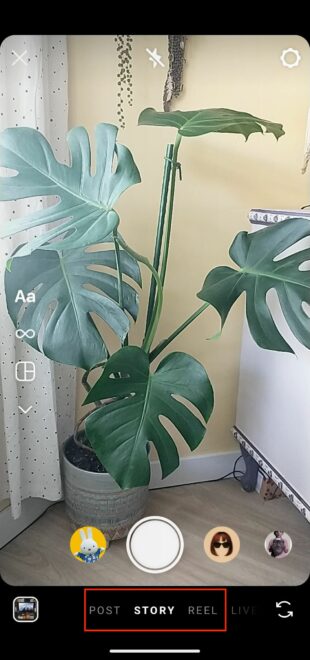
On the left side of the screen, you can select the format you want to experiment with: Choose Create, Boomerang, Layout, or Hands-Free format.
How to check Instagram Story views
If your Insta story is still live (meaning less than 24 hours have passed since you posted it), simply tap the Your Story icon on the app’s main page and the number of viewers of your story will be displayed. Tap the number in the bottom left corner to get a list of the people making up those Instagram Story views and see all the likes your story has received.
Packages for Influencers -> Instagram followers and likes, views of the highest quality for Your profile!
After 24 hours, when your Instagram Story disappears, you still have access to information including reach and views. (Reach is the number of unique accounts that viewed your story. Views is the total number of views of your Story.)
Here’s how to do it:
- On the app’s home page, tap your profile photo in the bottom right corner of the screen.
- Tap the menu icon in the top right corner and select Insights.
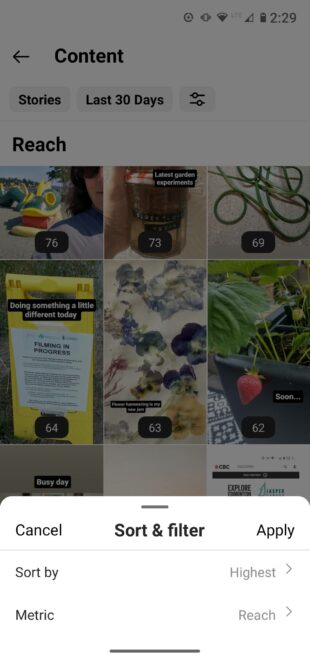
- Select the time period for which you want to view Insights: 7, 14, or 30 days, the previous month, the last 90 days, or a custom time frame.
- Scroll down to Content You’ve Shared and tap Stories.
- Tap the Sort and Filter icon and choose your metric and sorting options.
How to Schedule Instagram Stories
Posting Stories regularly is a great way to keep your audience engaged. But having to interrupt your workflow during the day to create and post Stories can be quite disruptive.
Scheduling Stories into your social media posting schedule will allow you to use your time more efficiently. You can also schedule Stories content to complement your other social media posts and effectively integrate it into any ongoing campaigns.
How to Use Instagram Stories Stickers
To add a sticker to your Instagram Story:
- Start creating your Story.
- Once your photo or video is ready, tap the sticker icon at the top of the screen — it’s a square with a smiley face and a folded corner.
- Select the type of sticker you want to use. Each type has its own properties. We’ll explain some of the most common ones below, but you can also experiment to see how each one behaves when you tap it. You can press and drag each sticker to change its position and size.

Link Stickers
To add a link to your Instagram Story, use the Link sticker:
- Tap the sticker icon.
- Select the LINK sticker.
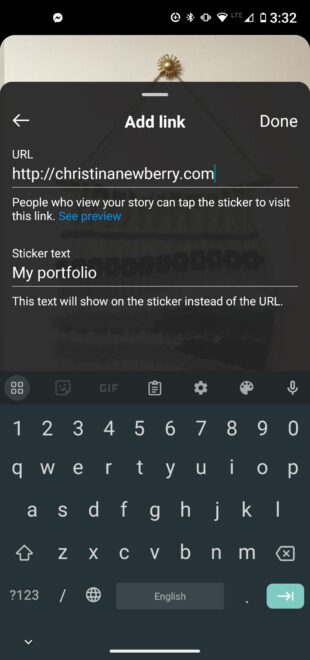
- Enter the URL of the link you want people to visit.
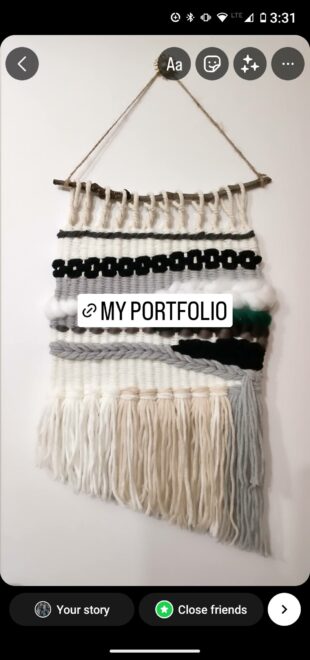
- In the Customize sticker text field, enter the text you want to appear on the link sticker itself. This can be much shorter than the URL, or you can use a CTA such as Learn More.
- Tap the sticker to change its color, and press and drag to place it where you want it.
Polls, quizzes and questions
Polls, quizzes and questions in Instagram Stories allow you to easily connect with your audience and encourage them to engage. You can also gather valuable feedback that can serve as a source of ideas for future content and campaign strategies.
Creating a poll in an Instagram Story:
- Tap the stickers icon.
- Select the POLL sticker.
- Enter your question.
- Enter your potential answers. The default is Yes/No, but you can enter any answer.
- Let the poll run for 24 hours.
- Don’t forget to share the results!
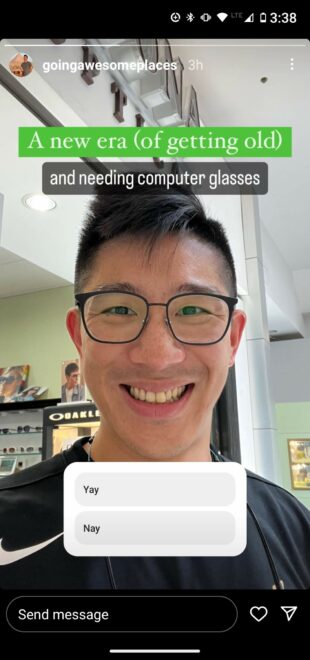
Source: @goingawesomeplaces
Quizzes are similar, except that you give your followers a choice of several options and they receive instant feedback on whether they made the right choice.
Creating an Instagram Story quiz:
- Tap the stickers icon.
- Select the QUIZ sticker.
- Enter the question prompt.
- Enter the possible answers.
- Tap the correct answer. It will be highlighted in green so people receive feedback on their choice.
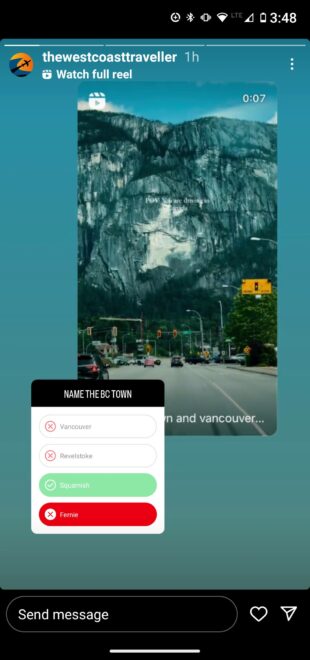
Source: @thewestcoasttraveller
Finally, questions in IG Stories offer a fully customizable way to make Stories interactive.
Instead of asking your followers what they think, the questions sticker allows your followers to ask you questions. Think of it as Instagram’s equivalent of an AMA (Ask me anything).
Using Instagram Stories questions:
- Tap the sticker icon.
- Select the QUESTIONS sticker.
- Customize the question prompt text.
- Tap Done.
You’ll find the questions in your viewers list. Tap any question to share and respond to it. The identity of the person asking will not be revealed.
Of course, you can get creative with the questions sticker and use it to ask your followers for any kind of comment:
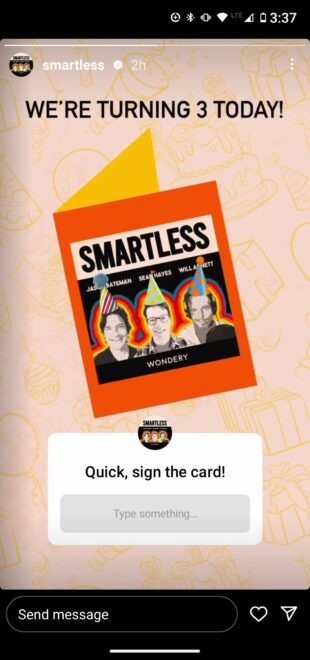
Source: @smartless
Hashtags
Adding a hashtag sticker to your Insta Story can help it get discovered by a wider audience.
There are two ways to add a hashtag to your Story:
- Use the #HASHTAG sticker.
- Use the regular text feature (tap the text sticker — the one that says Aa) and use the # symbol.
Once you start typing, Instagram will suggest several popular hashtags to help you out. You can add up to 10 hashtags to your Stories, but we recommend sticking to just a few of the most relevant ones.

Source: @teamcoco
How to use GIFs in Instagram Stories
GIFs are a great way to add movement and color to even the most static Instagram Story. Here’s the easiest way to add one:
- Tap the sticker icon and select the GIF sticker.
- Choose from recently used GIFs, trending GIFs, or search for the perfect GIF for your current Story.
- Tap the GIF you want to use to add it to your Story.
- Drag and drop the GIF to change its position and size.
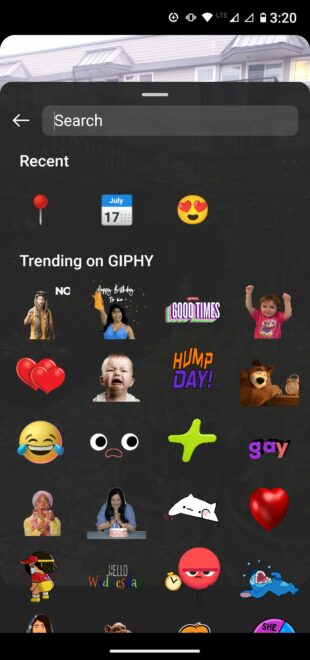
You can also upload your own GIF or post a GIF directly from GIPHY. Find out more in our blog post about adding GIFs to Instagram.
How to use saved audio in Instagram Stories
Adding saved audio to an Instagram Story is not available directly, but there are a few workarounds. These are legitimate methods that won’t get you into trouble with copyright.
For both methods, you’ll need to start by saving some audio. To do this, tap the name of the audio track in any Instagram content and tap the save button in the top right corner of the screen.
Adding saved audio to an Instagram Story using the Music Sticker
Note that this option only works for music, not for original audio tracks. With this method, your saved audio library essentially functions as a reminder file.
- On your Instagram profile, tap the menu icon (three lines) and select Saved.
- Tap Audio, then Music, and find the track you want to use. Write down the name of the track. (Or just remember it, if that works for you!)
- Create a Story and tap the Music sticker.
- Search for the track you just wrote down and add it to your Story from the Instagram Music library.
Adding saved audio to an Instagram Story using Reels
In this workaround, you’ll use the saved audio to create a Reel and then share it to your Story. It’s not seamless, but it’s the only option for using saved audio other than music tracks.
- On your Instagram profile, tap the menu icon (three lines) and tap Saved.
- Tap Audio and select the track you want to use.
- Tap Use Audio.
- Make sure you have Reel selected in the bottom menu (instead of Post). Add your photos and clips to complete your Reel. When you’re ready, tap Share. If you don’t want the Reel to appear on your main grid, turn off the Also Share to Feed slider option.
- Go to the Reels tab and tap the Reel you want to share.
- Tap the Share icon and then tap Add to Story.
- Resize the Reel as needed and tap Your Story.
How to use original audio in Instagram Stories
As seen in the section above, there is no elegant way to add someone else’s original audio to your Instagram Stories. Instead, you’ll need to create a recording and add that to your Story.
To add original sound from a saved sound library, follow the instructions above in the Using Reels to Add Saved Sound to an Instagram Story section.
Here’s what to do if you’re browsing Instagram Reels and come across an original sound you want to use right away:
- Tap the reel you want to use the sound from.
- Tap the name of the original audio track in the bottom left corner of the screen.
- Tap the Use Audio option.
- Follow steps 4 through 7 from the section above to add the reel to your Story.
How to Use Instagram Story Filters
First, let’s clarify something. Technically speaking, Instagram Story filters are minor color and sharpness adjustments you can make by swiping on your story. There are only 13 of them and they’re all named after cities.
Except for black-and-white Tokyo, is anyone still using them in 2024?
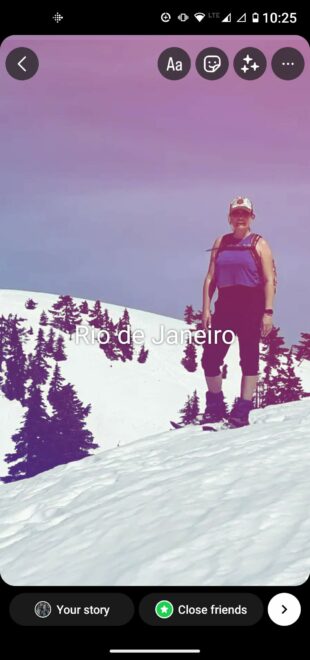

When most people talk about Instagram Story filters, they’re referring to the feature officially known as camera effects. Here are two ways to use them:
- Start a new story and choose one of the effects marked with circles at the bottom of the screen. Tap the camera switcher icon in the bottom right corner to use the selfie camera. Swipe left to see more effects, or scroll all the way to the end and tap the magnifying glass to search for a specific effect. You can then browse trending effects or browse by categories such as appearance and humor.
- If you see a story with an effect you like, tap the name of the effect in the top left corner of the screen, then tap Save Effect to save it for later, or Try It to use it immediately.
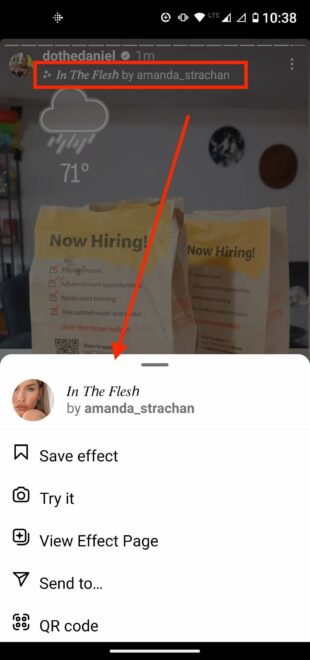
Sources: @dothedaniel / Instagram
How to Change the Instagram Stories Layout
Here’s how changing the layout of Instagram Stories works.
- Start a new story and tap the Layout icon in the left menu.
- Tap the four-part grid to see more options. You can choose whether to include two, three, four, or six photos in the layout.
Another option is to start a Story and open Create mode (more on that in the next section). Then tap the stickers icon and scroll down to select a sticker from the camera roll. Repeat this process to add more photos to your Story.
How to Use Create Mode on Instagram Stories
Create mode is an Instagram Stories feature that allows you to post an Instagram Story without photos or video. Just like with other types of Stories, you can use stickers to customize your Story.
To use Create mode on Instagram Stories:
- Start a new story and tap the Aa Create Mode icon on the left side of the screen.
- Start typing or swipe through the options at the bottom of the screen to create a memory, question, countdown, quiz, or other option.
- Tap the sticker icon at the top of the screen to add more effects.
- Tap the color icon in the bottom right corner of the screen to change the background color.
- Share your story.
How to add a location to Instagram Stories
Places and businesses can have a location page. Users can find the location page in the Places tab when searching, or by tapping a location in another user’s post. If your story ends up there, you can get many more views.
And if you have a brick-and-mortar establishment, the location page is where your satisfied customers can showcase their experiences with you and where potential customers can check you out. (To set up a location page for your business, you’ll need a business account on Instagram).
To use a location sticker on an Instagram story:
- Tap the sticker icon and select the location sticker.
- Select your preferred location from the list (it can be a store, street, or city — you can choose as broad or as specific as you like).
- Tap and drag to adjust the color, size, and placement of the sticker to complement the look of your Story.
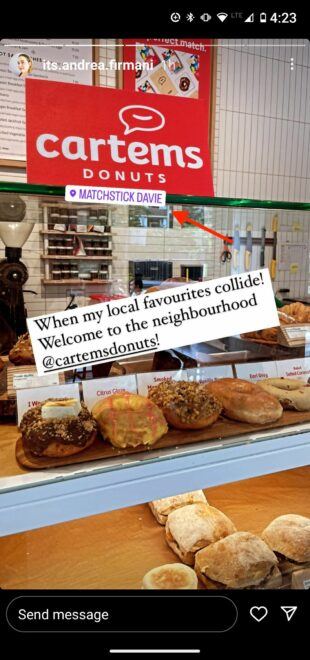
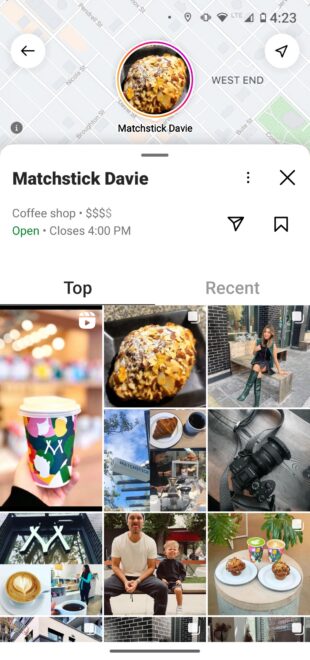
Sources: @its.andrea.firmani and Matchstick Davie location page
How to add captions to Instagram Stories
If you’re posting videos, captions are a great way to make your content more accessible. They’re also handy for those of us who choose to watch most Stories with the sound off.
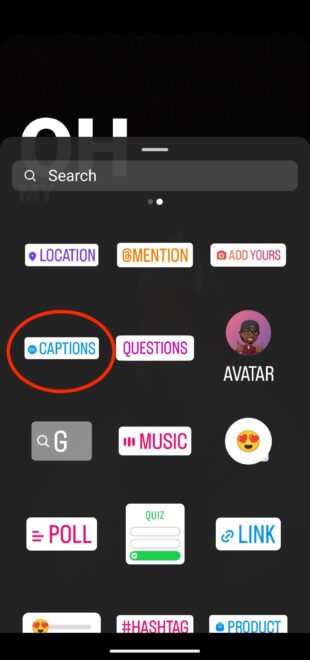
If you add a captions sticker, Instagram will automatically generate captions for your videos in Stories.
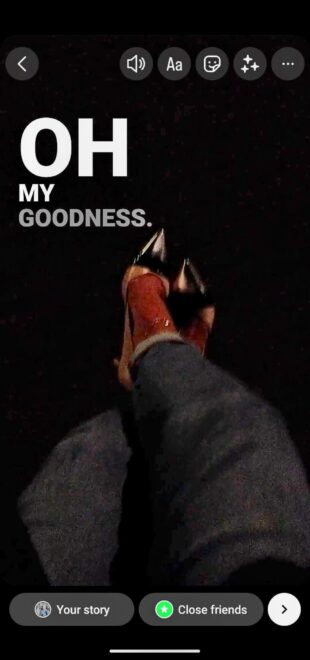
- Start creating your Story. The captions sticker will only appear if you use a video.
- Once the video is ready, tap the sticker icon at the top of the screen.
- Tap the Captions sticker.
- Instagram will automatically generate captions. It’s a good idea to review them to see how well the tool captured what you actually said. If something went wrong, tap the text to edit any word.
- Tap to change the font and color of the caption. When you’re happy with the captions, tap Done.
- You can press and drag the caption to reposition it and resize it just like any other sticker.
How to use Instagram Story Highlights
Stories don’t have to disappear after 24 hours. Highlighting will keep them pinned to your profile until you decide to remove them. It’s a great way to showcase your best content that defines your brand.
Each highlight can contain any number of Stories and you can continually add them as you post new content.
How to add an Instagram Story to a highlight:
- If the Story is less than 24 hours old and is still visible on Instagram, open it by tapping on Your Story, OR…
- If the Story is older than 24 hours, load it from the archive. Tap your profile icon in the bottom right corner, then tap the menu icon (three lines) in the top right corner. Tap Archive. Navigate back to the Story you want to highlight.
- In the bottom right corner of the screen, tap the Highlight icon.
- Select the highlight you want to add the Story to, OR…
- Create a new highlight.

How to Use Instagram Stories for Shopping
If you haven’t yet set up your business for Instagram Shopping, you’ll need to do that first. Check out our step-by-step guide to setting up Instagram Shopping for all the details.
Once your account is set up, simply use the shopping sticker to make your Stories shoppable.
- Create a Story as usual.
- Before sharing, tap the sticker icon at the top of the screen.
- Tap the Product sticker.
- Select the product, collection, or storefront from your catalog that you want to tag. You can also choose to tag a product from another business, which will allow them to reshare the Story.
- Tap the sticker to edit the name of the product or service you are promoting.
- You can move and resize the shopping sticker by dragging and tapping.
- Share your Story.


Packages for Influencers -> Instagram followers and likes, views of the highest quality for Your profile!
You might also be interested in:
How to get more followers on Instagram in 2023
Top 10 influencers in Germany by number of followers
Answers to the 60 most frequently asked questions about Instagram
How to switch to a PRO TikTok account
How to increase Instagram followers
How to enable dark mode on Instagram on iOS and Android
How to find out who is viewing my Story on Instagram
List of the 10 most followed Instagram accounts in the world
If you want results right away, you can get the Instagram followers and likes package right now.






Michal Záruba is a digital marketing specialist and a consultant in social media and SEO. For more than 8 years, Michal has been helping brands grow online through strategic content, search engine optimisation and effective communication on platforms such as LinkedIn, Instagram and YouTube.
On the blog, Michal shares practical tips on how to combine SEO, social media and brand building into one working strategy, focusing on how companies can use modern tools and algorithms so that their brand gains not only reach but also trust.
Alongside creating content, Michal lectures on digital marketing, trains teams and follows new trends in AI and search.