
Image Sizes for All Social Networks
The latest image sizes for various social networks, including Instagram, X (f.k.a. Twitter), Facebook, LinkedIn, TikTok, and more.

Social Media Image Sizes for 2023
Image sizes for all social networks:
- Instagram image sizes
- X (f.k.a. Twitter) image sizes
- Facebook image sizes
- LinkedIn image sizes
- Pinterest image sizes
- Snapchat image sizes
- YouTube image sizes
- TikTok image sizes
Why is it important to choose the right image sizes on social networks?
It seems that image sizes on social networks are constantly changing.
One moment you have the perfect cover page for your account. The next moment its size is changed and it looks all pixelated and bad.
Packages for Influencers -> Instagram followers and likes, views of the highest quality for your profile!
It doesn’t help that information about official image dimensions and sizes is harder to find than a decent political discussion on Facebook.
But it’s not difficult if you read this guide to image sizes on all the major social media platforms!
Below are the latest social media image dimensions as of November 2023.
All Social Media Image Sizes
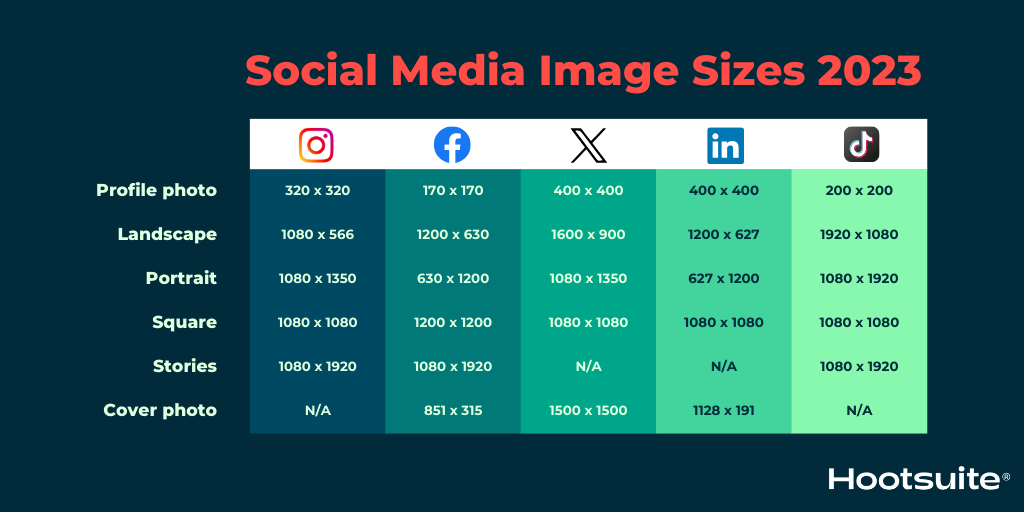
We cover each network in more detail below, but this image includes the social media image sizes you are most likely looking for.
Basic Instagram Image Sizes
- Profile photo: 320 x 320 px
- Landscape: 1080 x 566 px
- Portrait: 1080 x 1350 px
- Square: 1080 x 1080
- Stories and Reels: 1080 x 1920
Basic Facebook Image Sizes
- Profile photo: 170 x 170 px
- Landscape: 1200 x 630 px
- Portrait: 630 x 1200 px
- Square: 1200 x 1200 px
- Stories and Reels: 1080 x 1920 px
- Cover photo: 851 x 315 px
Basic X (formerly Twitter) Image Sizes
- Profile photo: 400 x 400 px
- Landscape: 1600 x 900 px
- Portrait: 1080 x 1350 px
- Square: 1080 x 1080 px
- Cover photo: 1500 x 1500 px
Basic LinkedIn Image Sizes
- Profile photo: 400 x 400 px
- Landscape: 1200 x 627 px
- Portrait: 627 x 1200 px
- Square: 1080 x 1080 px
- Cover photo: 1128 x 191 px
Basic TikTok Image Sizes
- Profile photo: 200 x 200 px
- Landscape: 1920 x 1080 px
- Portrait: 1080 x 1920 px
- Square: 1080 x 1080 px
- Stories: 1080 x 1920 px
Instagram Image Sizes
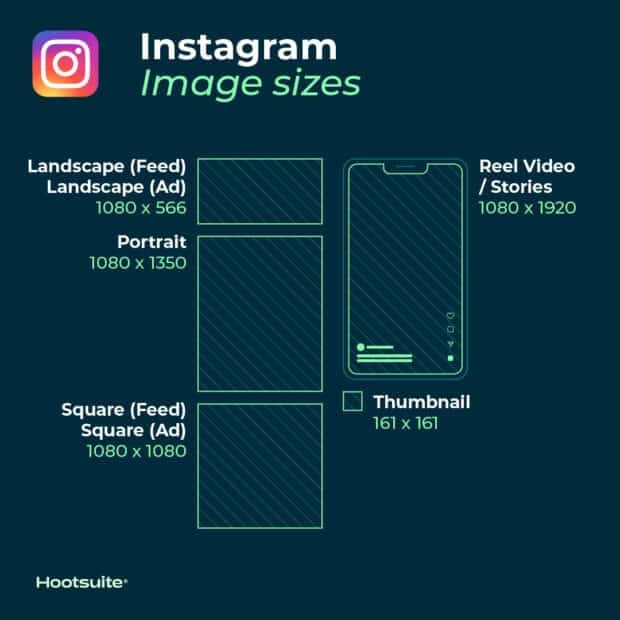
Instagram supports both horizontally and vertically oriented images. It also still supports square images, which the platform was known for when it first launched.
This expands the options available to your brand. At the same time, it makes it a bit more complex to get image dimensions right. Follow these guidelines to ensure your images end up looking their best.
Instagram Profile Photo Size: 320 x 320 pixels
Instagram profile photos are displayed at 110 x 100 pixels, but image files are stored at 320 x 320 pixels, so make sure to upload an image that is at least that large.
Even though the dimensions are in a square format, Instagram profile photos are displayed as a circle. Make sure that any elements you want to highlight in the photo are centered so they don’t get cropped out.
Instagram post sizes (feed photos):
- Landscape: 1080 x 566 pixels
- Portrait: 1080 x 1350 pixels
- Square: 1080 x 1080 pixels
- Supported aspect ratios: Any aspect ratio: from 1.91:1 to 4:5
- Recommended image size: Width of 1080 pixels, height between 566 and 1350 pixels (depending on whether the image is landscape or portrait).
Tips:
- If you want your images to look their best on Instagram, upload an image with a width of 1080 pixels.
- When you share an image on Instagram larger than 1080 pixels, Instagram will resize it to 1080 pixels.
- If you share an image with a resolution smaller than 320 pixels, Instagram will enlarge it to 320 pixels.
- If your image is between 320 and 1080 pixels wide, Instagram will keep the photo at its original resolution, “as long as the photo’s aspect ratio is between 1.91:1 and 4:5 (height between 566 and 1350 pixels at a width of 1080 pixels)”.
- If the uploaded image on Instagram has a different aspect ratio, the platform will automatically crop the photo to fit the supported ratio.
Instagram photo thumbnail sizes:
- Display size: 161 x 161 pixels
- Recommended upload size: 1080 pixels wide
Tips:
- Keep in mind that Instagram stores versions of these thumbnails up to 1080 x 1080.
- To future-proof your Instagram feed and avoid pixelation, upload the largest images possible.
Instagram Stories image size: 1080 x 1920 pixels
Tips:
- This is a 9:16 aspect ratio.
- Uploading an image with a smaller pixel size (but the same aspect ratio) means the Story will load quickly.
- If you don’t use this ratio, the Story may appear with odd cropping, zooming, or may leave large portions of the screen blank.
- Instagram Reels use the same size.
Instagram carousel image sizes:
- Landscape: 1080 x 566 pixels
- Portrait: 1080 x 1350 pixels
- Square: 1080 x 1080 pixels
- Aspect ratio: landscape (1.91:1), square (1:1), vertical (4:5)
- Recommended image size: Width of 1080 pixels, height between 566 and 1350 pixels (depending on whether the image is landscape or portrait).
Instagram Reels sizes:
- 1080 x 1920 pixels
- That is a 9:16 aspect ratio.
- Cover photo: 1080 x 1920 pixels
- Keep in mind that Reels are cropped to a 1:1 image in your profile feed and to a 4:5 image in the home feed.
Instagram ad image sizes:
- Landscape: 1080 x 566 pixels
- Square: 1080 x 1080 pixels
- Minimum width: 320 pixels
- Maximum width: 1080 pixels
- Supported aspect ratios: Any aspect ratio: 1.91:1 to 4:5
Tips:
- Keep in mind that Instagram ads displayed in users’ feeds cannot contain more than 30 hashtags.
- There are also recommendations for the number of characters in the primary text and headline of the ad.
Image sizes for Instagram Stories ads: 1080 x 1920 pixels
Tips:
- Instagram recommends keeping roughly “14% (250 pixels) of the top and bottom of the image free of text and logos” to avoid them being covered.
- Since September 2020, Facebook and Instagram ads are no longer penalized if more than 20% of the ad space consists of text.
X (f.k.a. Twitter) image sizes
Tweets that contain images consistently get more clicks, more likes, and more retweets than tweets without images. Tweets with visual content are three times more likely to generate engagement.
So choosing the right images and creating great visual content for X (formerly Twitter) matters. And that naturally includes using the correct image sizes.
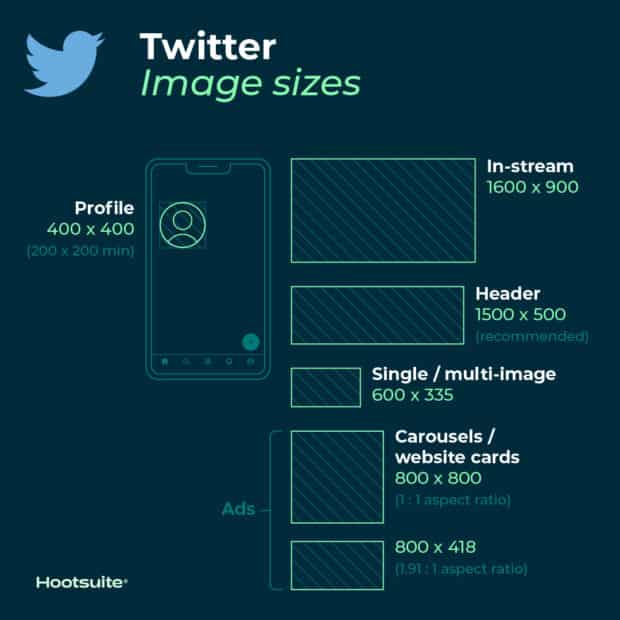
X (Twitter) image sizes for profile photos: 400 x 400 (recommended)
- Minimum image size: 200 x 200 pixels
- Maximum file size: 2 MB
X (Twitter) header photo size: 1500 x 500 pixels (recommended)
Tips:
- To future-proof your image, it’s best to use the maximum size.
- Header images are cropped to a 3:1 aspect ratio.
- Keep in mind that the way header images are displayed varies depending on the monitor and browser being used.
X (Twitter) image sizes for in-stream photos: 1600 x 900 pixels (recommended)
- Minimum size: 600 x 335 pixels
- Recommended aspect ratio: any aspect ratio between 2:1 and 1:1 on desktop; 2:1, 3:4, and 16:9 on mobile
- Supported formats: GIF, JPG, and PNG
- Maximum file size: 5 MB for photos and GIFs on mobile. Up to 15 MB on the web.
X (Twitter) card image size:
X (Twitter) will recognize when a post contains a URL. The platform will then crawl that webpage and pull content from it, including the image for the summary card. (Here’s how that works, by the way.)
- Minimum size: 120 x 120 pixels
- Supported formats: GIF, JPG, PNG
- Maximum file size: 1 MB
Tips:
- You can use the card validator to test and preview what your summary card will look like.
- There are a number of different X cards available, and therefore a number of sizes. In addition to regular summary cards, there are summary cards with large images, app cards, and player cards.
X (Twitter) image sizes for ads:
- Single and multi-image tweets: For best results, use larger images.
- Website card image: 800 x 418 pixels for a 1.91:1 aspect ratio. 800 x 800 for a 1:1 aspect ratio. Maximum file size 20 MB.
- App card image: 800 x 800 pixels for a 1:1 aspect ratio. 800 x 418 pixels for a 1.91:1 aspect ratio. Maximum file size 3 MB.
- Carousels: 800 x 800 pixels for a 1:1 aspect ratio. 800 x 418 pixels for a 1.91:1 aspect ratio. Maximum file size 20 MB for 2–6 image cards.
- Direct message card: 800 x 418 pixels for a 1.91:1 aspect ratio. Maximum file size 3 MB.
- Conversation card: 800 x 418 pixels for a 1.91:1 aspect ratio. Maximum file size 3 MB.
Facebook image sizes
Facebook constantly updates its design and image dimensions. The best strategy for future-proofing your brand’s content is to always upload the highest quality images possible. For best results, stick to the file formats recommended by Facebook.
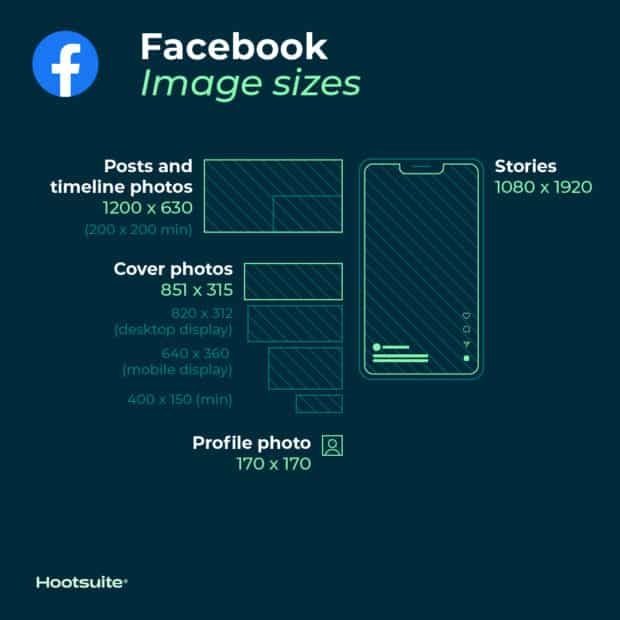
Facebook profile picture size: 170 x 170 pixels (on most computers)
Your Facebook profile picture will display at 170 x 170 pixels on desktop. However, on smartphones it will appear as 128 x 128 pixels.
Facebook image sizes for cover photos: 851 x 315 pixels (recommended)
- Desktop display size: 820 x 312 pixels
- Smartphone display size: 640 x 360 pixels
- Minimum size: 400 x 150 pixels
- Ideal file size: Less than 100 KB
Tips:
- To avoid compression or distortion, upload a JPG or PNG file.
- Use the recommended pixel sizes for the fastest loading times.
- Profile pictures and cover photos featuring logos or text are best uploaded as a PNG file.
- After uploading a cover photo, do not drag or reposition it.
Facebook timeline photo and post sizes:
When uploading photos to the timeline, Facebook automatically resizes and formats them to be 500 pixels wide and to match a 1.91:1 aspect ratio.
However, by keeping these dimensions in mind, you can avoid pixelation or slow loading times:
- Recommended size: 1200 x 630 pixels
- Minimum size: 600 x 315 pixels
Tips:
- If you are sharing 2-10 images using the carousel display in your brand’s Facebook post, the images should have dimensions of 1200 x 1200.
- This is a 1:1 ratio.
Facebook event cover photo sizes: 1200 x 628 pixels (recommended)
Tips:
- This is a 2:1 ratio.
- The event cover photo size cannot be edited after it has been added to the event.
Facebook image sizes for panoramic or 360° photos:
- Minimum image size: Facebook states it should have “30,000 pixels in any dimension and less than 135,000,000 pixels in total size”.
- Aspect ratio: 2:1
Tips:
- Facebook automatically recognizes and processes these images based on “camera-specific metadata found on photos taken with 360°-ready devices”.
- These image files on Facebook can be up to 45 MB for JPEG files or 60 MB for PNG files.
- Facebook recommends using JPEG files for 360° photos and ensuring that files are no larger than 30 MB.
Image sizes for Facebook Stories: 1080 x 1920 pixels (recommended)
Tips:
- Facebook Stories take up the entire phone screen. That is a 9:16 aspect ratio.
- Do not choose an image less than 500 pixels wide.
- For Stories with text, consider leaving 14% of the top and bottom free of text. (That is 250 pixels.) This way, any call to action will not be covered by your brand’s profile photo or buttons.
Image sizes for Facebook ads:
- Sizes for Facebook Feed ads: At least 1080 x 1080 pixels. Minimum size 600 x 600 pixels. Ratio 1.91:1 to 1:1. Maximum file size 30 MB.
- Sizes for Facebook right column ads: At least 1080 x 1080 pixels. Minimum size 254 x 133 pixels. Ratio 1:1. (Remember: This is a desktop-only ad format.)
- Image sizes for Facebook Instant Articles: At least 1080 x 1080 pixels. Ratio 1.91:1 to 1:1. Maximum file size 30 MB.
- Image sizes for Facebook Marketplace ads: At least 1080 x 1080 pixels. Ratio 1:1. Maximum file size 30 MB.
- Image sizes for Facebook search: At least 1080 x 1080 pixels. Minimum size 600 x 600 pixels. Ratio 1.91:1 to 1:1. Maximum file size 30 MB.
- Image sizes for Facebook sponsored messages: At least 1080 x 1080 pixels. Ratio 1.91:1 to 1:1. Maximum file size 30 MB.
- Sizes for Messenger inbox ads: At least 1080 x 1080 pixels. Ratio 1:1. Minimum size 254 x 133 pixels. Maximum file size 30 MB.
- Sizes for Messenger Stories ads: At least 1080 x 1080 pixels. Ratio 9:16. Minimum width 500 pixels.
LinkedIn image sizes
If you use LinkedIn for business – whether through a personal profile or a company page – it has been proven that pairing LinkedIn updates with images increases the number of comments and shares.¨¨
Packages for Influencers -> Instagram followers and likes, views of the highest quality for Your profile!
For the best results, stick to the recommended sizes listed below. And always make sure you’ve reviewed your profile and content on multiple devices before finalizing them.
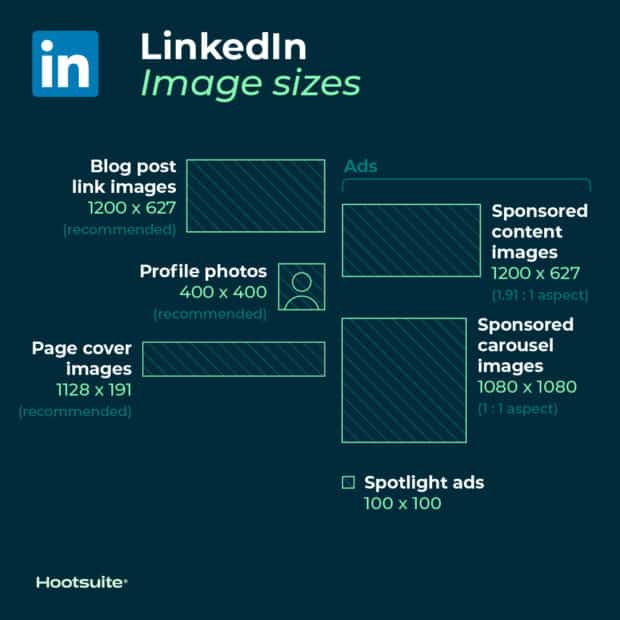
LinkedIn image sizes for profile photos: 400 x 400 pixels or larger (recommended).
Tips:
- LinkedIn can accommodate photos with a resolution of up to 7680 x 4320 pixels.
- It also supports files up to 8 MB in size, so you can upload the largest files possible going forward.
LinkedIn image sizes for personal profile cover photos: 1584 x 396 pixels (recommended)
- Aspect ratio: 4:1
Tips:
- Make sure your file is smaller than 8 MB.
- Cover photos are cropped differently on mobile and desktop. Make sure you’ve reviewed your profile on both types of display before finalizing.
LinkedIn image sizes for company pages:
- Company logo size: 300 x 300 pixels
- Cover image size: 1128 x 191 pixels
- Life tab main image size: 1128 x 376 pixels
- Life tab custom module image size: 502 x 282 pixels
- Life tab company photos image size: 900 x 600 pixels
- Square logo: Minimum 60 x 60 pixels
Tips:
- When posting image updates on a company page, remember to use PNG or JPG images.
- Use an aspect ratio of 1.91:1.
- The recommended LinkedIn post size is 1200 x 628 pixels.
- These LinkedIn image sizes also apply to LinkedIn Showcase Pages.
LinkedIn image sizes for blog post link images: 1200 x 627 pixels (recommended)
Custom LinkedIn image size for sharing a link in an update: 1200 x 627 pixels (recommended)
When inserting a URL into an update, an automatically generated thumbnail image may appear in the preview if one is available, along with the title of the article or webpage.
However, you can customize it by clicking the Image icon below the text box and selecting a photo from your computer.
Tips:
- The image should have a 1.91:1 ratio.
- More than the minimum width of 200 pixels.
- If the image is less than 200 pixels wide, it will appear as a thumbnail on the left side of the post.
Image sizes for LinkedIn ads:
- Company logo size for ads: 100 x 100 pixels
- Logo size for Spotlight ads: 100 x 100 pixels
- Custom background image for Spotlight ads: 300 x 250 pixels
- Sponsored content images: 1200 x 627 pixels (aspect ratio 1.91:1).
- Sponsored content carousel images: 1080 x 1080 pixels (aspect ratio 1:1).
Image sizes on Pinterest
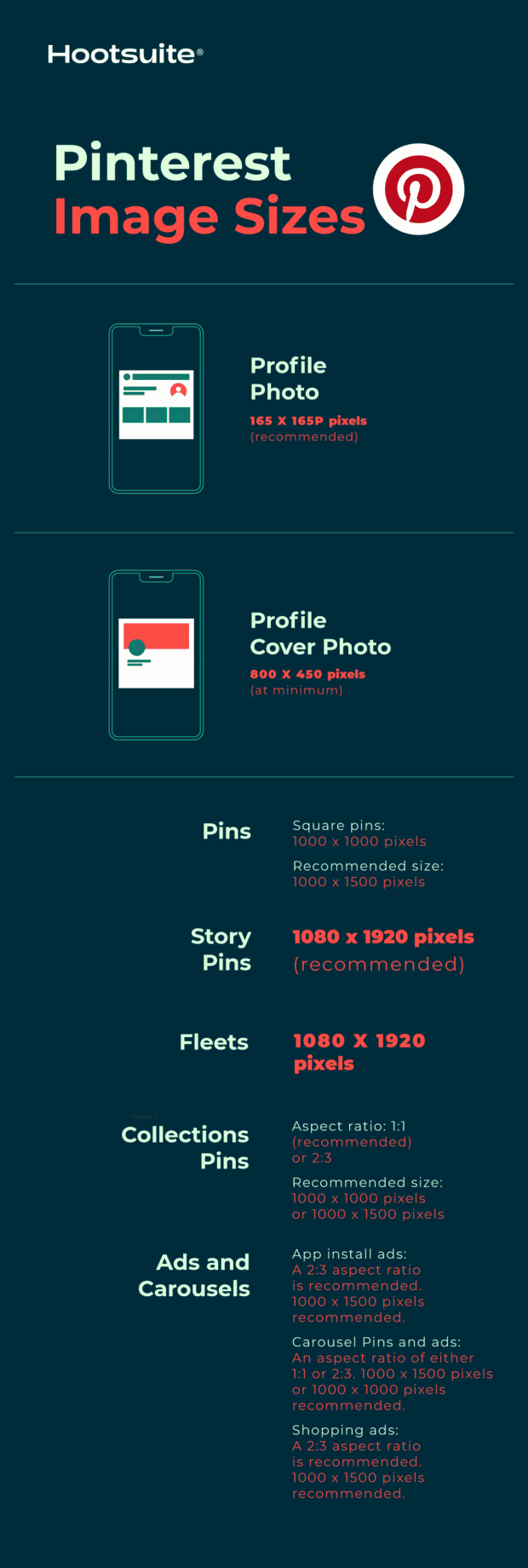
Pinterest profile image size: 165 x 165 pixels (recommended)
Tips:
- Remember that your profile photo will be displayed as a circle.
Pinterest profile cover photo image size: 800 x 450 pixels (minimum)
Tips:
- Try to avoid placing a portrait photo in the cover photo spot.
- Instead, use a landscape photo with a 16:9 aspect ratio.
Pinterest image sizes for Pins:
- Aspect ratio: 2:3 (recommended)
- Square Pins: 1000 x 1000 pixels
- Recommended size: 1000 x 1500 pixels
- Maximum file size: 20 MB
Tips:
- Maintaining a 2:3 aspect ratio will ensure that your brand’s audience sees all the image details in their feed.
- Pins appear in the feed with a fixed width of 236 pixels.
- If you want to create Pins with a different aspect ratio, be aware that Pinterest crops images from the bottom.
- Both PNG and JPEG files are accepted.
Image sizes for Pinterest Collection Pins:
- Aspect ratio: 1:1 (recommended) or 2:3
- Recommended size: 1000 x 1000 pixels or 1000 x 1500 pixels
- Maximum file size: 10 MB
Tips:
- This format displays as one main image above three smaller images.
- All images must have the same aspect ratio.
- Collections appear in feeds on mobile devices.
- Both PNG and JPEG files are accepted.
- Collections can also be a Pinterest ad format.
Pinterest image size for Story Pins:
- Aspect ratio: 9:16
- Recommended size: 1080 x 1920 pixels
- Maximum file size: 20 MB
Image sizes for Pinterest ads and carousels:
- App install ads: Same specifications as standard Pins. A 2:3 aspect ratio is recommended. Recommended resolution 1000 x 1500 pixels.
- Carousel Pins and ads: Aspect ratio: 1:1 or 2:3. Recommended 1000 x 1500 pixels or 1000 x 1000 pixels. Up to 5 images can be included in a carousel.
- Shopping ads: Same specifications as standard Pins. A 2:3 aspect ratio is recommended. Recommended dimensions 1000 x 1500 pixels.
Snapchat Image Sizes
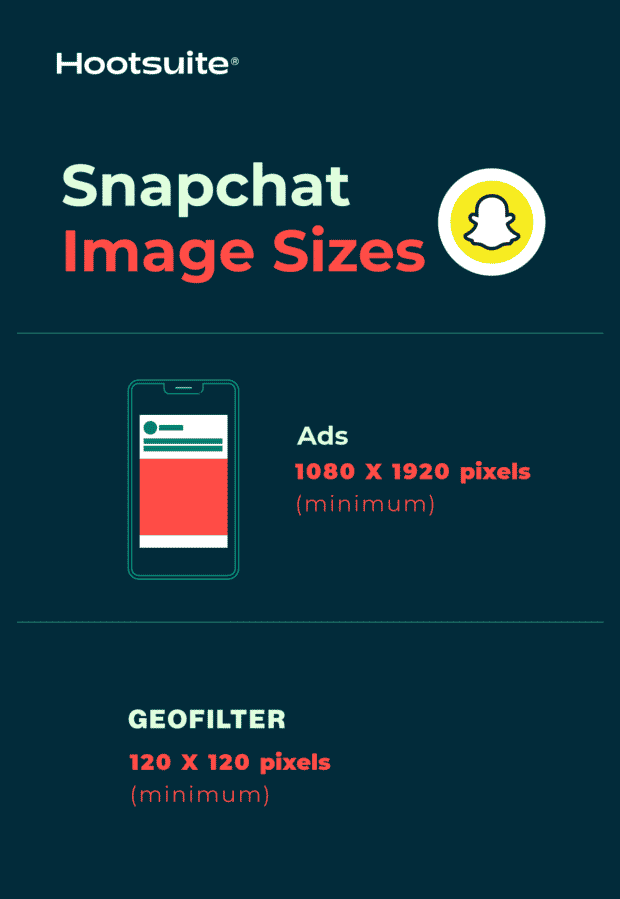
Snapchat ad image size: 1080 x 1920 pixels (minimum)
- Aspect ratio: 9:16
- File type: JPEG or PNG
- Maximum file size: 5 MB
Snapchat Geofilter image size: 1080 x 1920 (minimum)
- Aspect ratio: 9:16
- File type: JPEG or PNG
- Maximum file size: 5 MB
YouTube image sizes
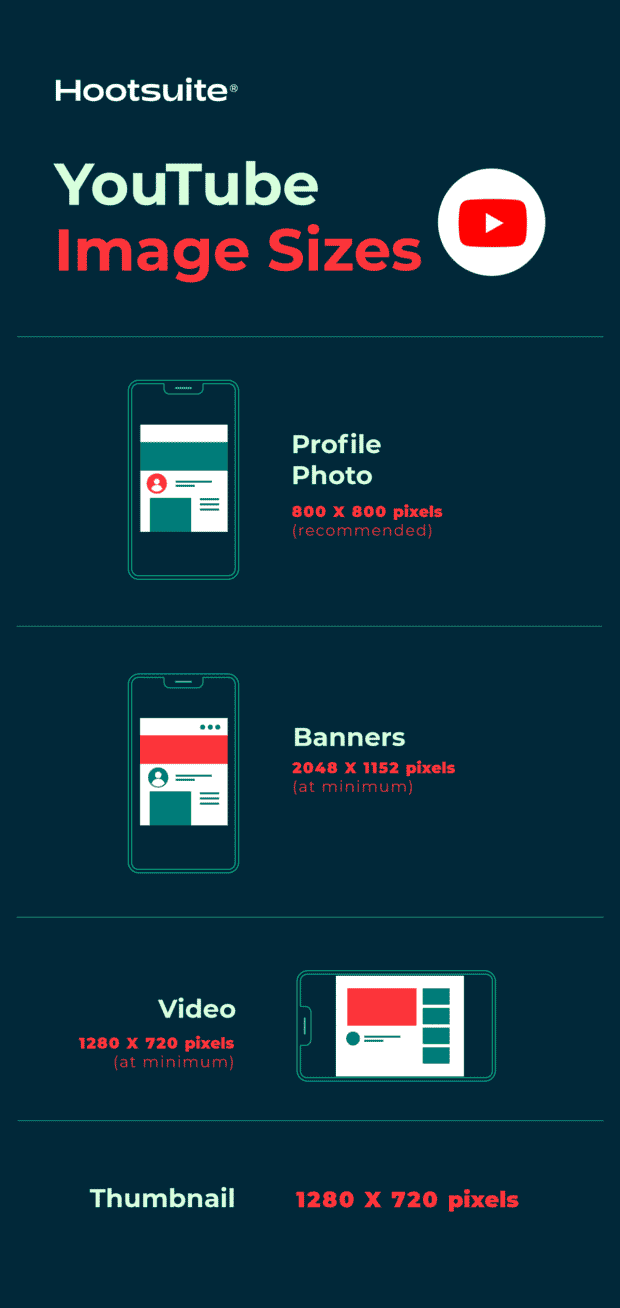
YouTube profile photo size: 800 x 800 pixels (recommended)
Tips:
- For best results, make sure the photo is focused on the center.
- Files should be in JPEG, GIF, BMP, or PNG format. Animated GIF files will not work.
- Photos will render at 98 x 98 pixels.
YouTube banner size: 2048 x 1152 pixels (minimum)
- Aspect ratio: 16:9
- Minimum safe area for text and logos without cropping: 1235 x 338 pixels
- Maximum file size: 6 MB
YouTube video size: 1280 x 720 pixels (minimum)
Tips:
- YouTube recommends that videos intended for sale or rental have a higher pixel count: 1920 x 1080 pixels.
- YouTube requires videos to have a resolution of 1280 x 720 pixels to meet HD standards.
- This is a 16:9 aspect ratio.
YouTube thumbnail size: 1280 x 720 pixels
TikTok image sizes
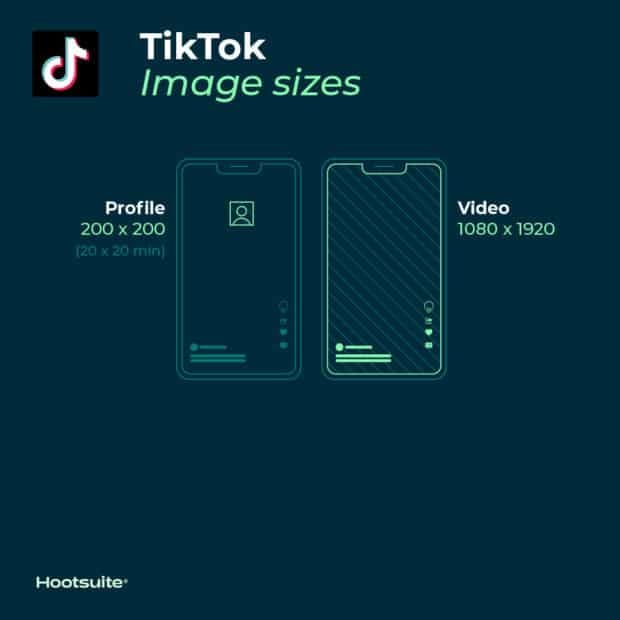
TikTok profile photo size: 20 x 20 pixels (minimum upload size)
Tips:
- The minimum upload size is 20 x 20, but upload a higher quality photo to future-proof your profile.
TikTok video size: 1080 x 1920
Tips:
- The ideal aspect ratio for TikTok videos is 9:16.
TikTok carousel image size: 1080 x 1920 (for best results)
Tips:
- The ideal aspect ratio for TikTok carousel images is 9:16 or 1:1, but you can also post images with a 4:5 ratio.
Why does choosing the right image sizes for social media matter?
When creating visual content for social media, social media marketers have many things to get right.
You need to make sure that all images used do not violate copyright laws. If you don’t have original images available, you need to find high-quality stock photos. And you need to figure out which of the available tools will help you take your social media images to the next level.
In addition, you need to correctly choose the image sizes for social media. And getting the settings right is really important, because:
- It avoids pixelation and unpleasant image stretching. This will make your images look professional.
- Your photos will be optimized for the feeds of individual social networks. This can help increase engagement.
- It ensures that your audience sees the entire photo. The wrong size could cut off part of your brand’s message.
- It can future-proof your content. Keeping track of social media image sizes now can mean less work for your brand in the future when the network changes the way it displays images again.
Packages for Influencers -> Instagram followers and likes, views of the highest quality for Your profile!
You might be interested in:
How to share someone else’s story on Instagram to your own or send it as a direct message
How to create a slideshow on TikTok
How to get more followers on TikTok: 28 tips to quickly grow your account
How to delete an Instagram profile
12 tactics for getting more followers on Instagram
How to create a short video tutorial for Instagram
14 tips for creating viral videos for TikTok
How to launch your own Instagram subscription?
If you want results right away, you can get an Instagram followers and likes package right now.





Michal Záruba is a digital marketing specialist and a consultant in social media and SEO. For more than 8 years, Michal has been helping brands grow online through strategic content, search engine optimisation and effective communication on platforms such as LinkedIn, Instagram and YouTube.
On the blog, Michal shares practical tips on how to combine SEO, social media and brand building into one working strategy, focusing on how companies can use modern tools and algorithms so that their brand gains not only reach but also trust.
Alongside creating content, Michal lectures on digital marketing, trains teams and follows new trends in AI and search.