
The desire to get a large number of likes and the disappointment when a new photo doesn’t receive many “red hearts” can negatively affect users’ mental health. To help prevent users from feeling depressed, Instagram has launched a new feature for hiding the number of likes.

How to Hide Likes on Instagram
Since spring 2021, instead of a specific like count, people see the username of one person who liked the post along with the word “others” beneath photos or videos. If this feature caught your attention, keep reading our article!
Packages for Influencers -> Instagram followers and likes, views of the highest quality for Your profile!
Reading time – 5 minutes
Contents
- How to hide the like count on Instagram
- How to turn off likes on Instagram when publishing posts
- How to remove likes from an existing post on Instagram
- How to turn off the like count on other Instagram users’ posts
- Can you hide the like count on Instagram from a computer?
- Let’s sum it up
How to Hide the Like Count on Instagram
So how can you hide the like count on Instagram? Below we offer a complete step-by-step guide for those who want to disable them on their new or existing posts. You will also learn how to prevent likes from appearing on other users’ posts on Instagram.
How to Turn Off Likes on Instagram When Publishing Posts
If you no longer want to see the like count under your posts, you can turn them off in the Instagram settings.
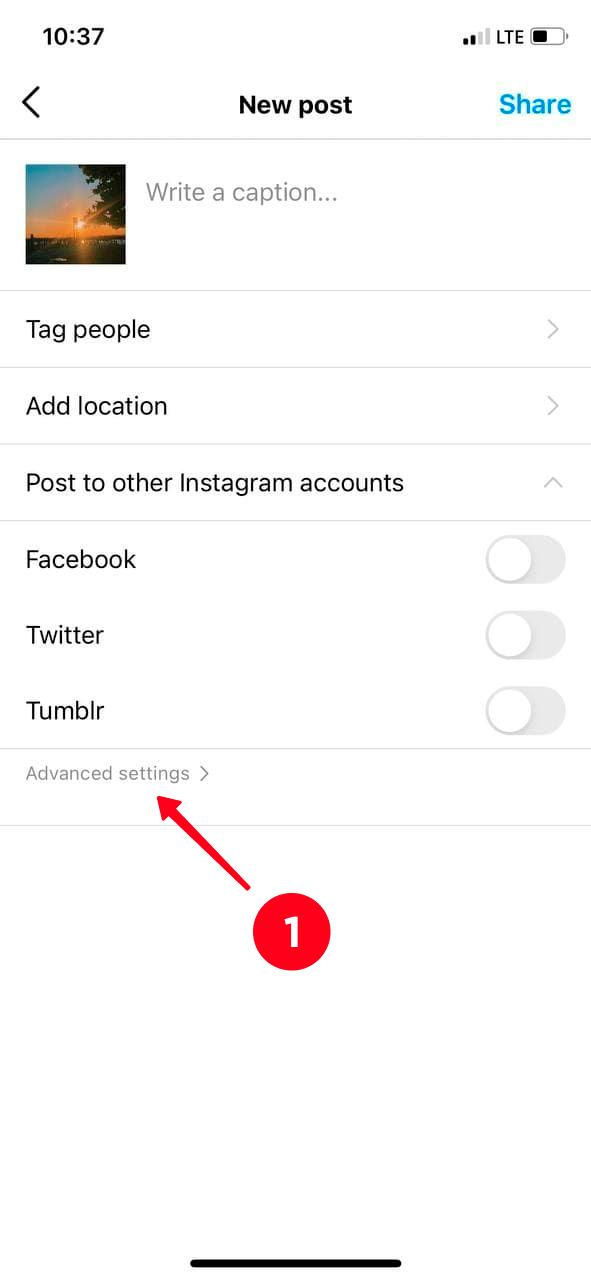
1. Add a post and before tapping the Share option, scroll down until you find the Advanced Settings item.
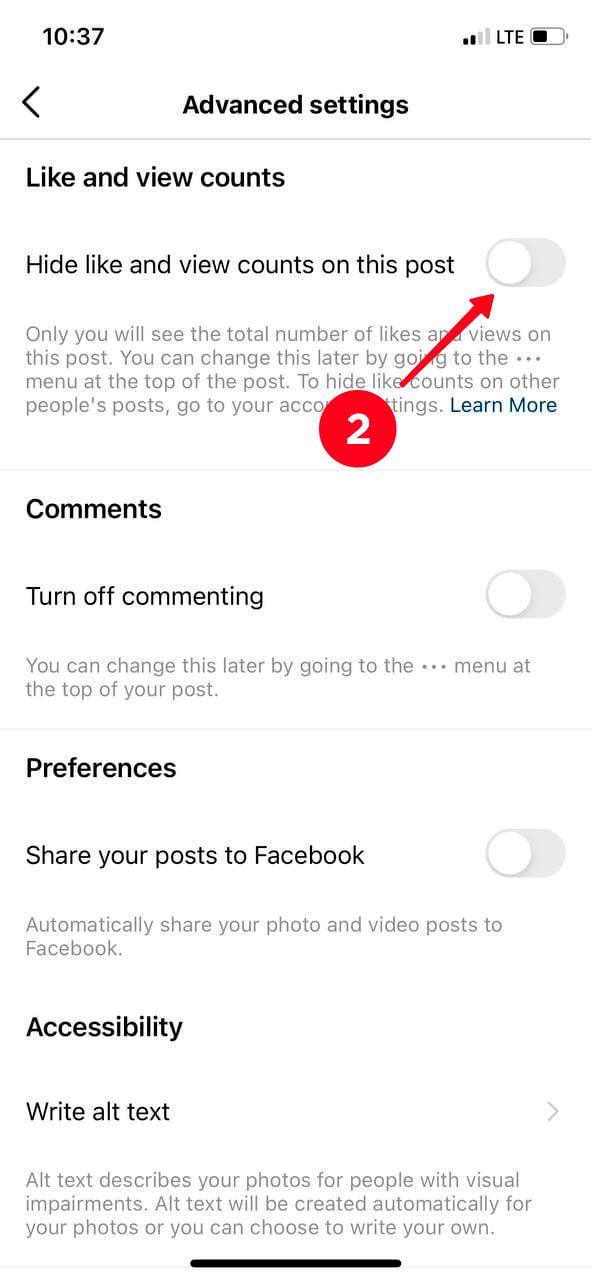
2. Toggle the slider to the right next to Hide like and view counts on this post.
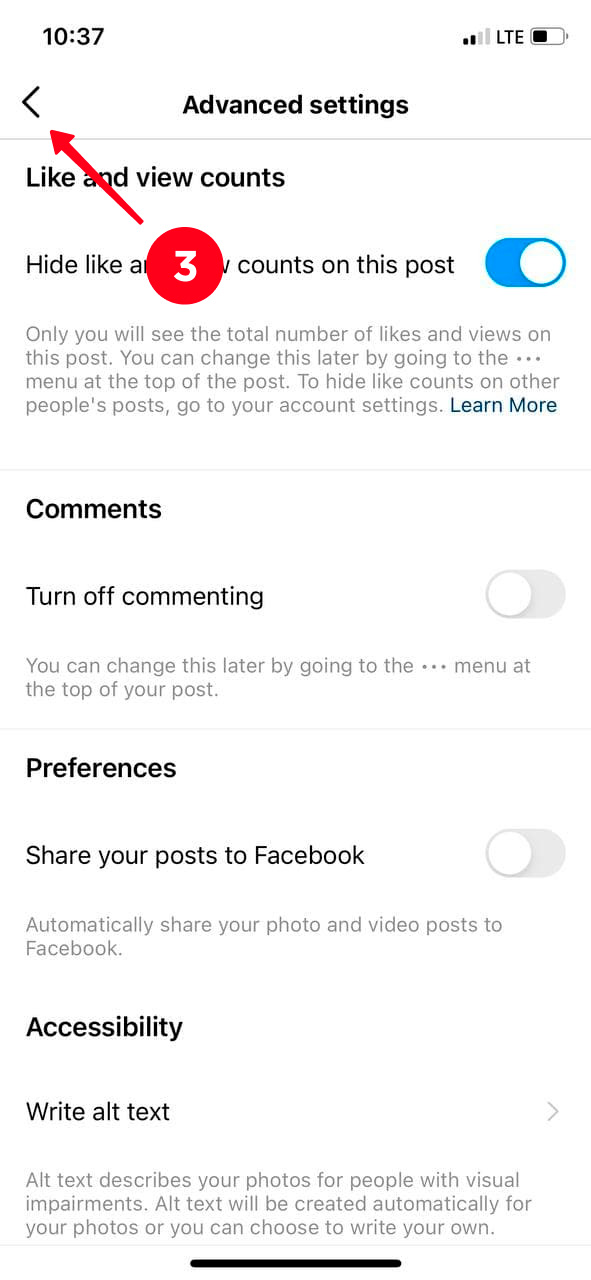
3. To share the post, tap the Back icon in the upper left corner.
4. Then press the Share button.
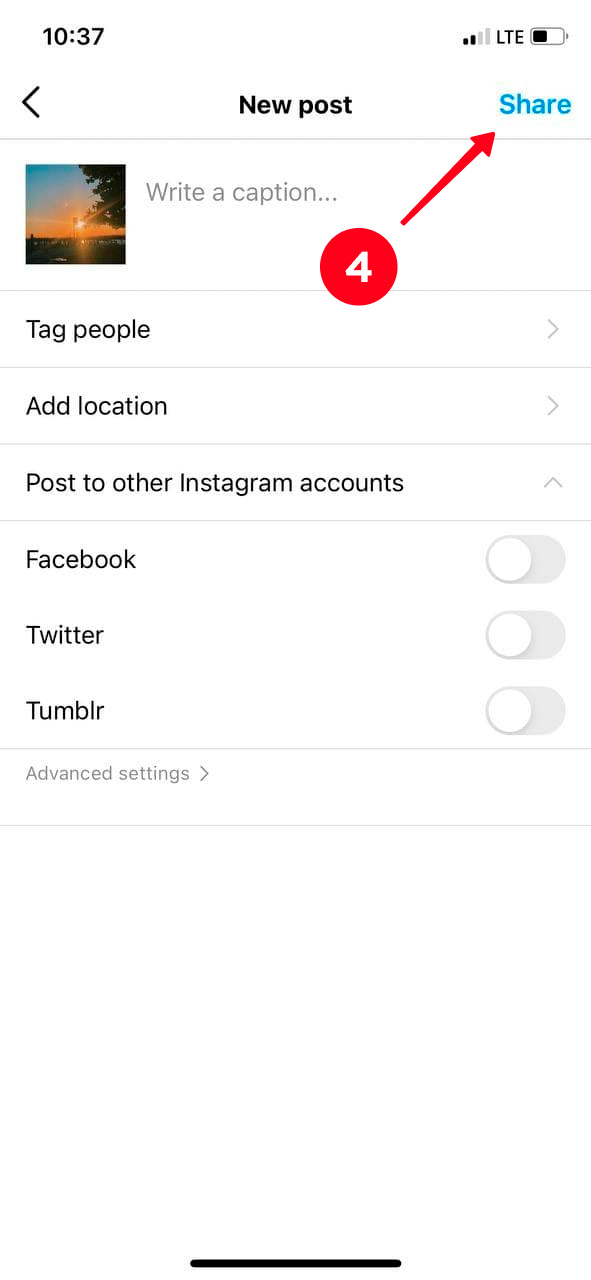
Done! Don’t worry! The likes you’ve received won’t disappear anywhere. Their total count will be preserved.
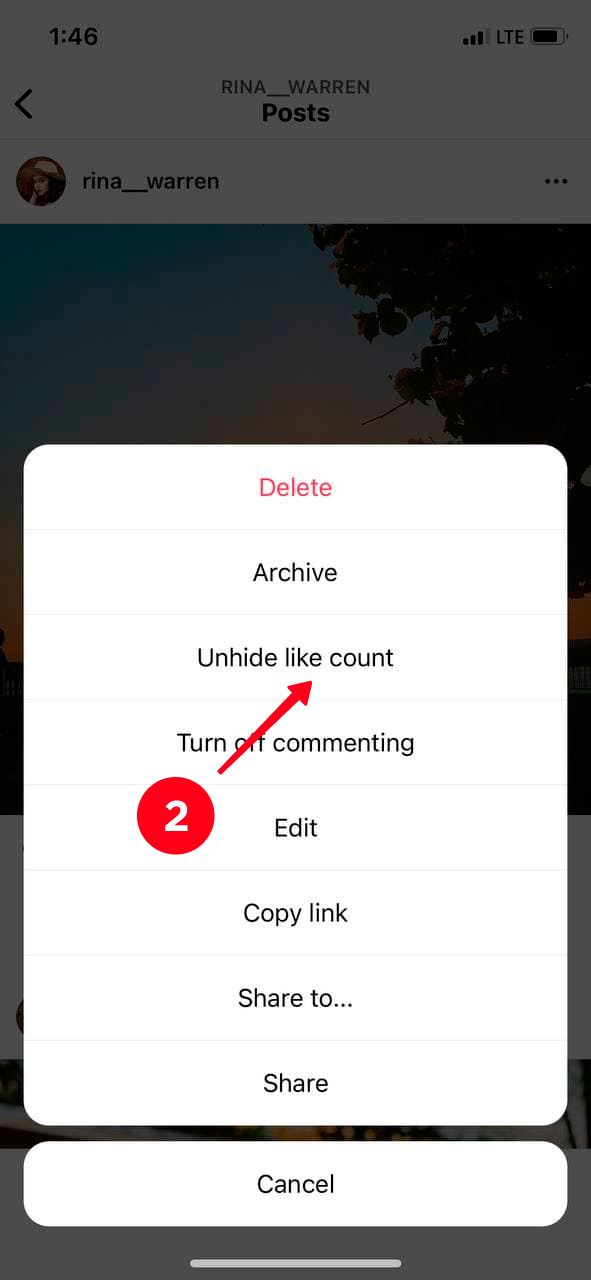
Note: you can undo the removal of likes on Instagram at any time. When you want to display the like count again, tap the three dots in the upper right corner and select the Unhide like count option.


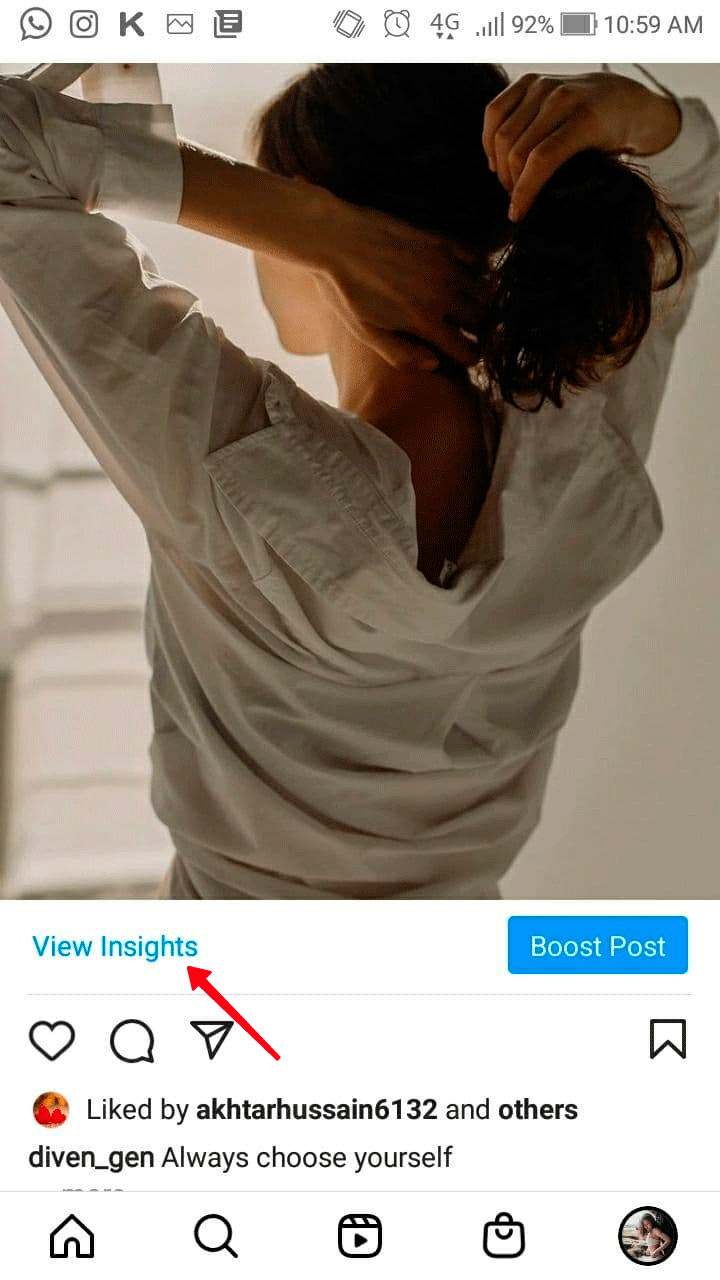
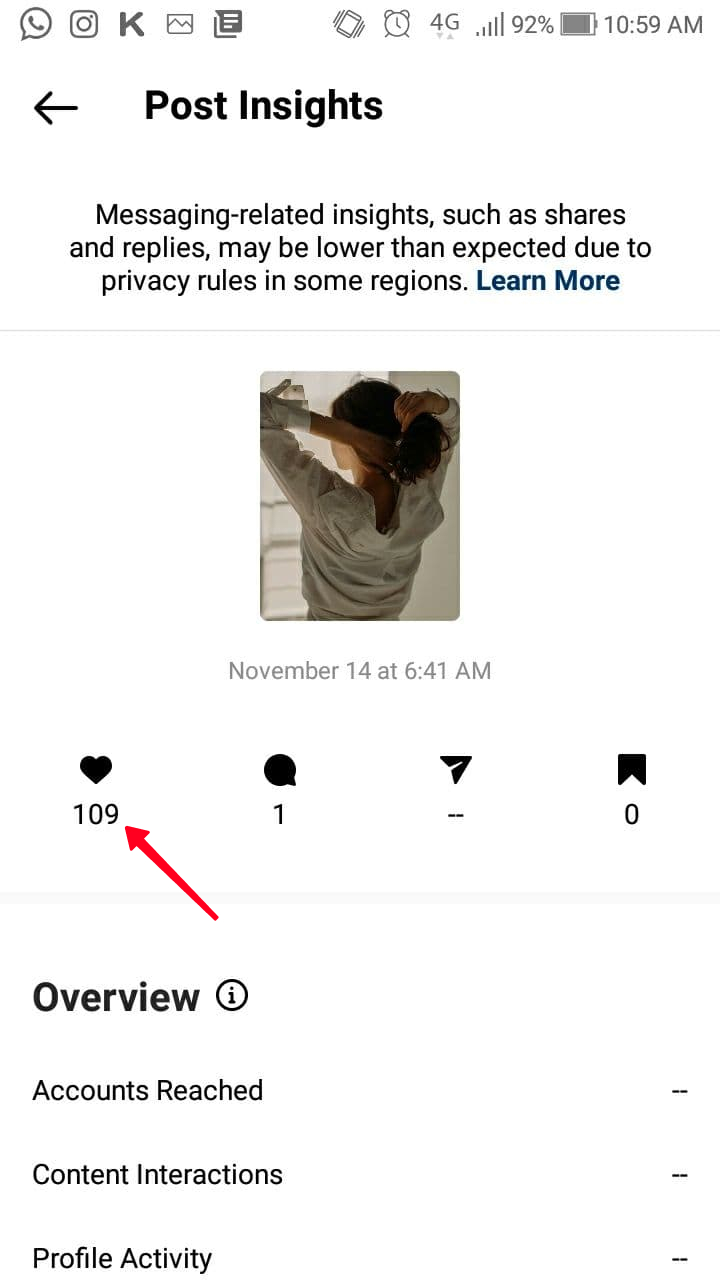
If you remove likes from a business account on Instagram, you can still find out their count if you want. You can track the numbers in the Insights app. Simply tap View Insights under the post and check how much users like your post.
By the way, if you are planning to add a photo to your Instagram Feed, first check what time is best to post it so that as many people as possible can see it.
How to remove likes from an existing Instagram post
If some of your photos or videos in the Feed haven’t received as many red hearts as you’d like, or you simply want to run an account where they don’t play an important role, you can turn off likes on that Instagram profile in a few steps.
1. Select the post for which you want to hide likes and tap the three dots in the upper right corner.

2. Press the Hide like count button.
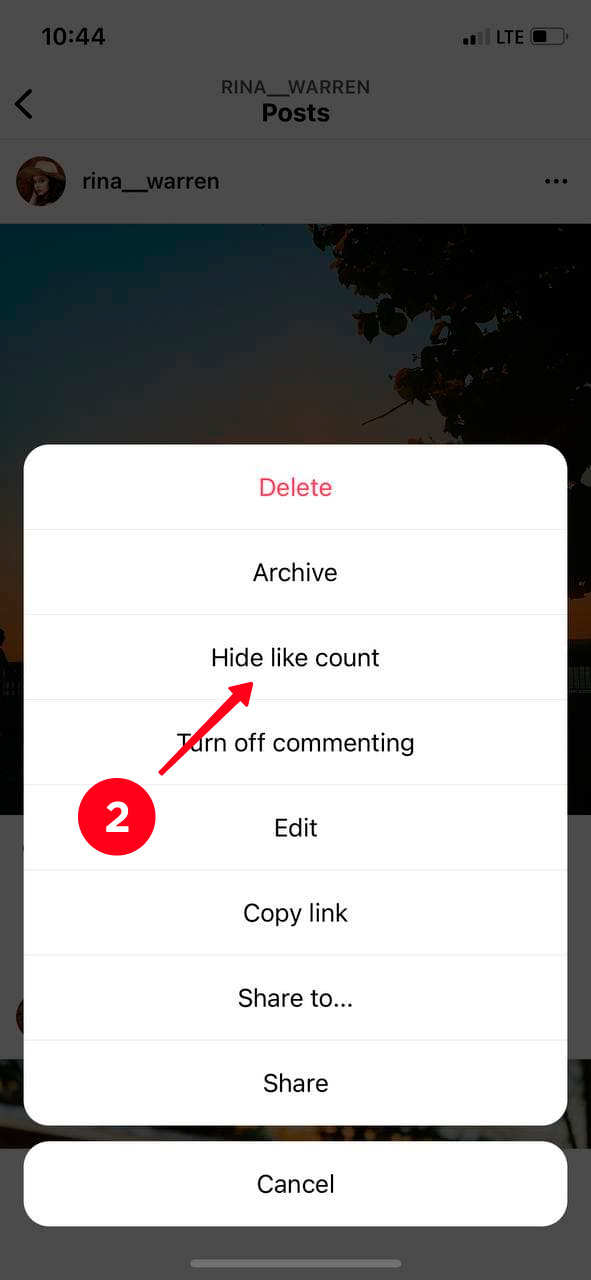
That’s it! The like count is now turned off for this Instagram post and neither you nor anyone else will see it.

Note: Instagram does not have a feature that can hide likes on all posts at once. Therefore, you need to work with each publication individually.
How to turn off like counts on other Instagram users’ posts
You can hide likes not only on your own Instagram posts, but also on other users’ publications. In other words, if you use this feature, your Instagram Feed will look like this:

6 steps to remove likes from other users’ accounts
If you are sure that you don’t want Instagram to display likes under other users’ posts, follow these steps:
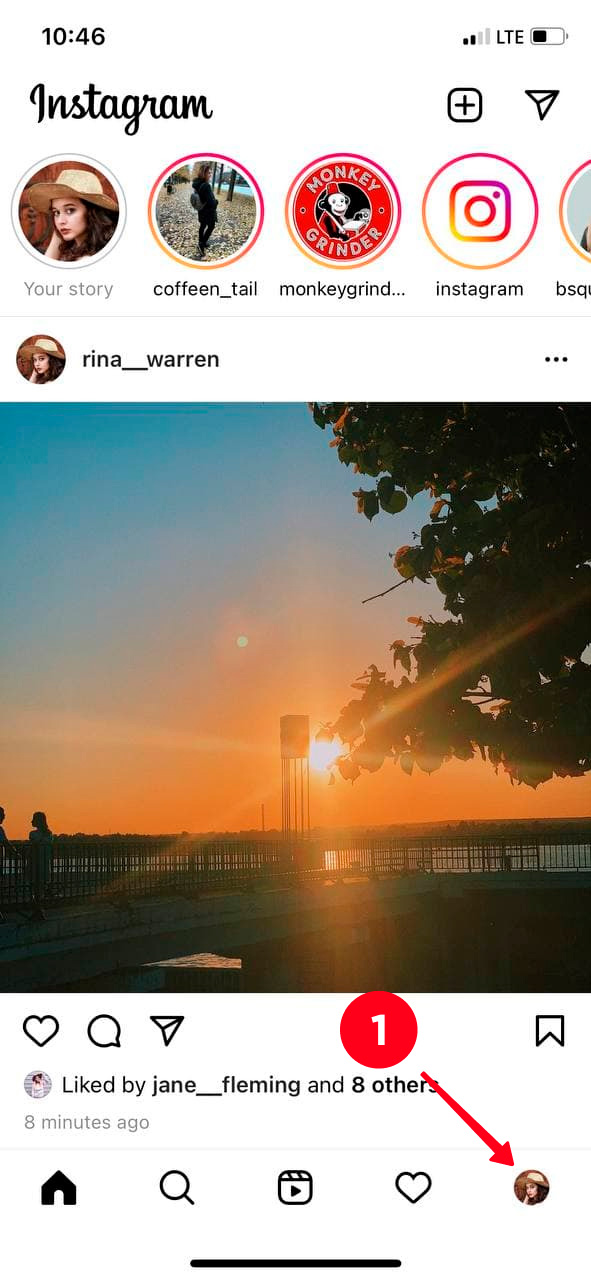
1. Tap your profile photo in the bottom right corner.
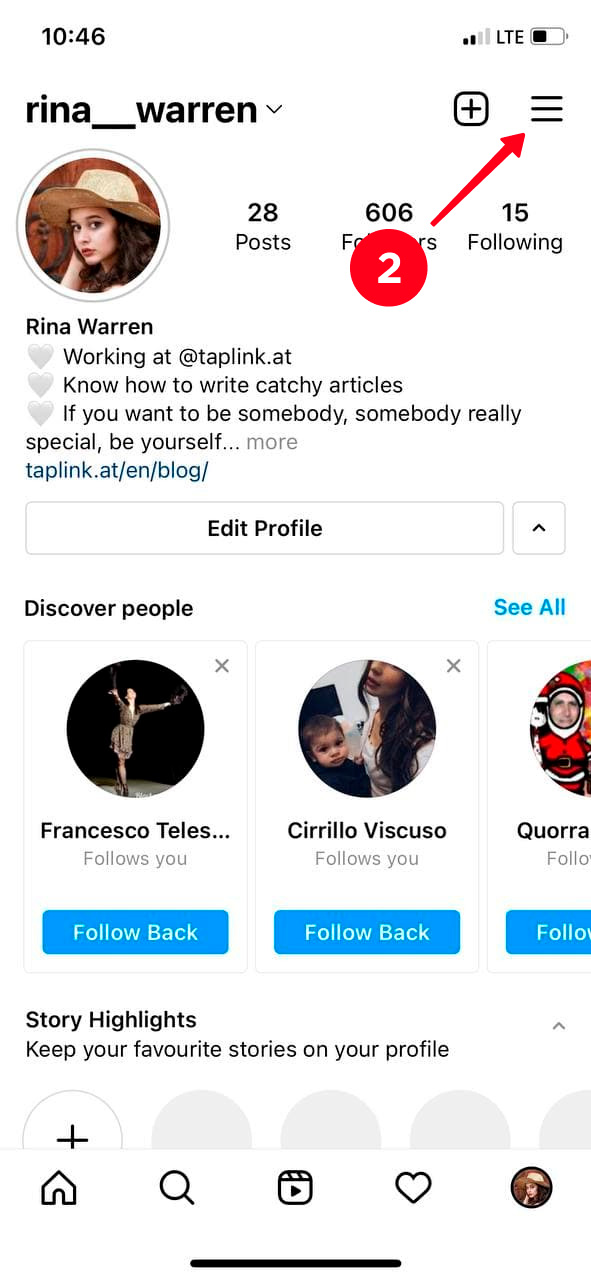
2. Then find the three dots in the upper right corner.
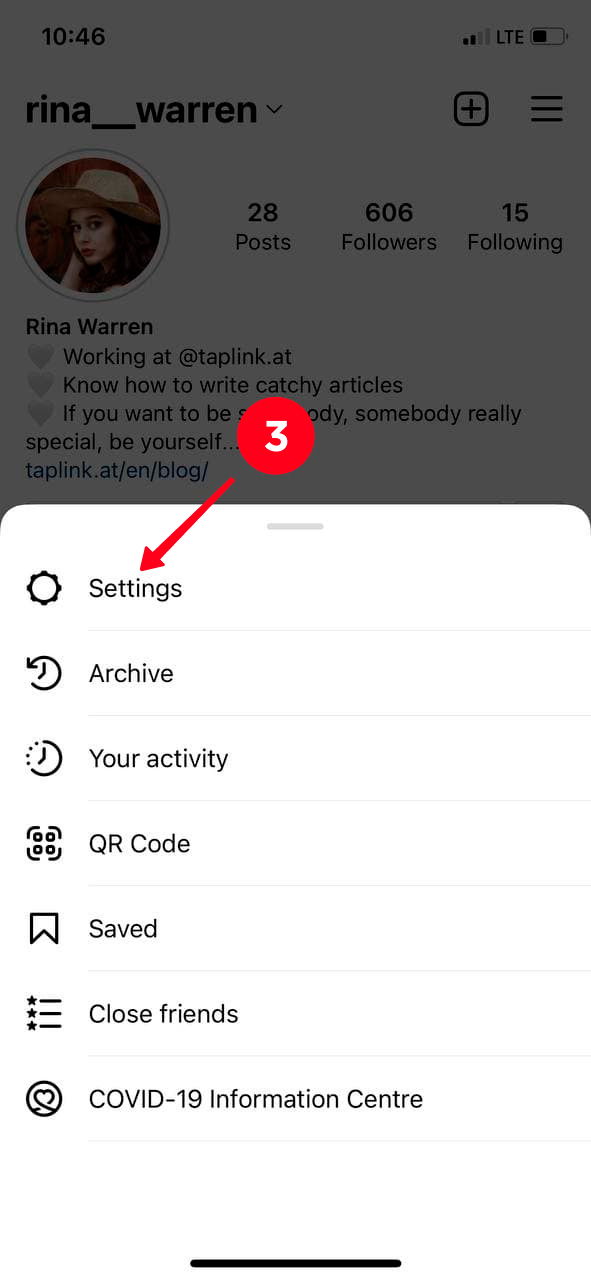
3. Go to Settings.
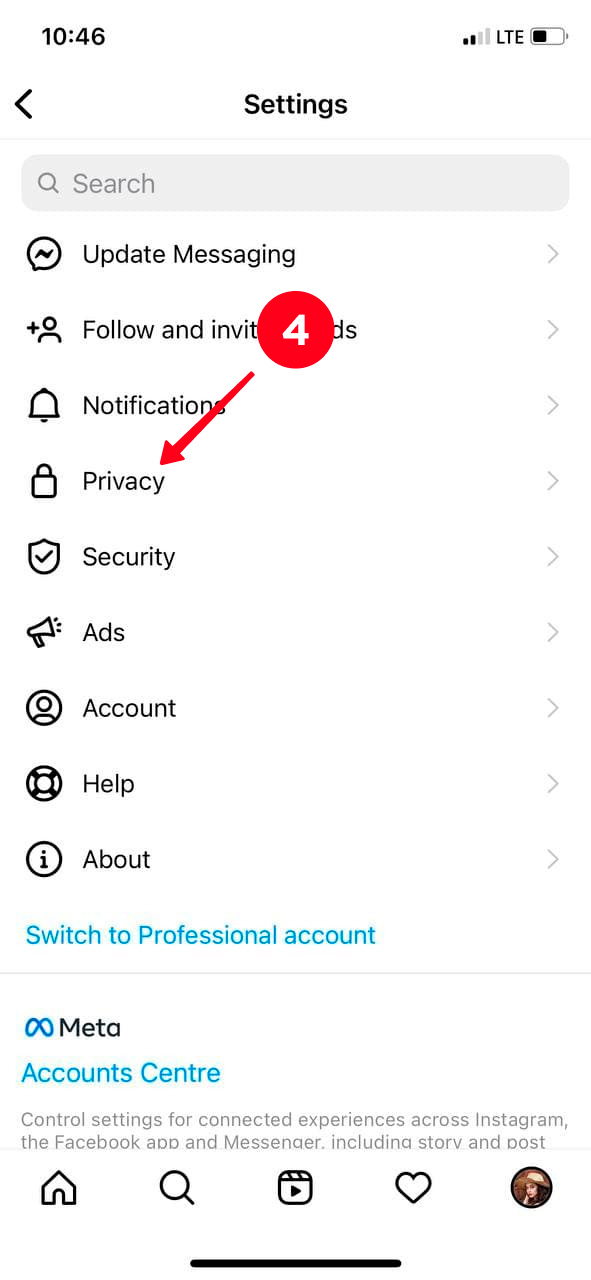
4. Select Privacy.
5. Posts.
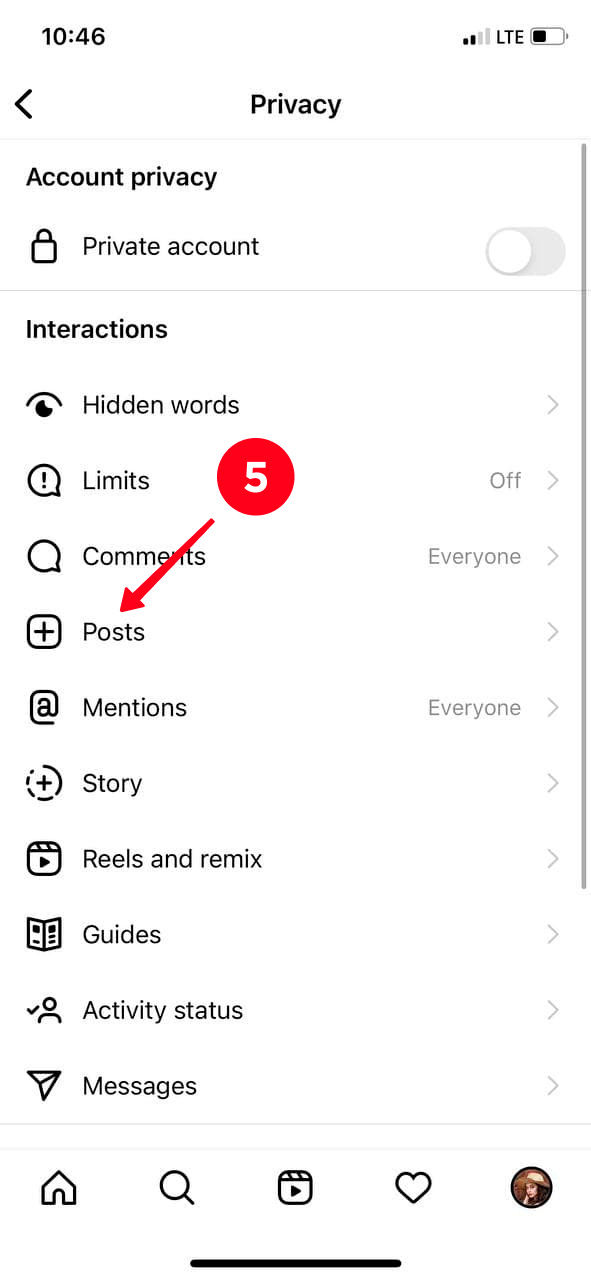
6. Toggle the slider to the right next to Hide Like and View Counts.
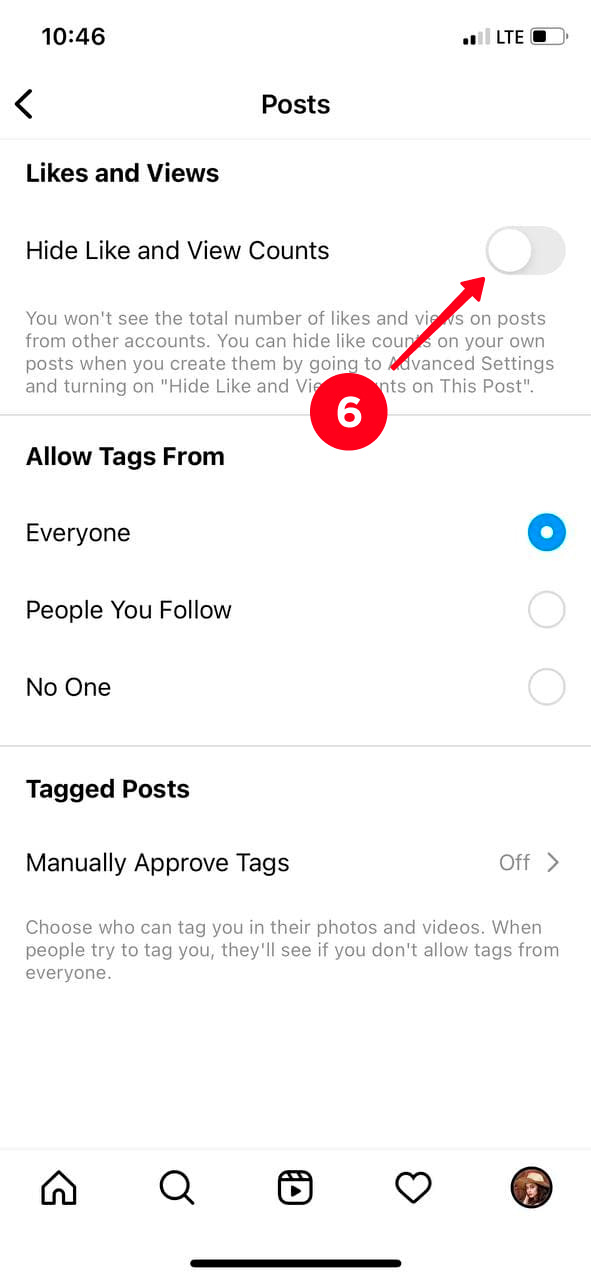
Done! You have hidden the likes on your Instagram post. Now, instead of a like count, it will display Liked by [username] and others.

If you want to know exactly who liked a photo or video on Instagram, simply tap the Others option and the full list of users will appear.
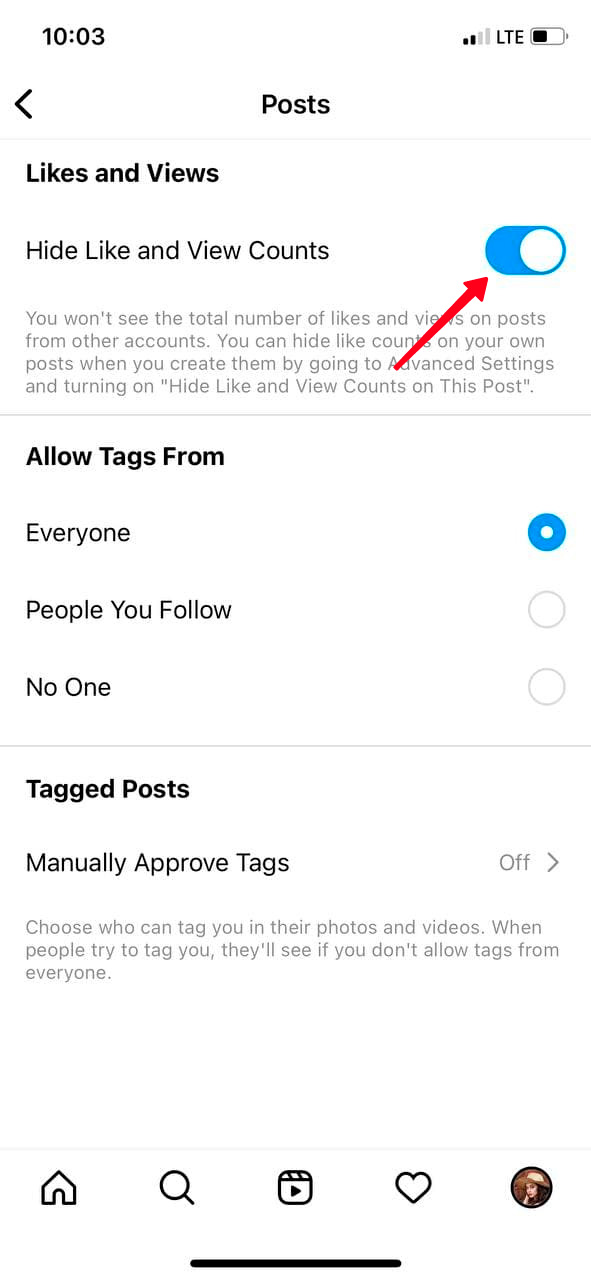
If, on the other hand, you want to see the total number of likes, follow all the steps above but at the end toggle the slider to the left next to Hide Like and View Counts.
Can I Hide Like Counts on Instagram from a Computer?
No, Instagram likes cannot be hidden from a computer. This feature is not available in the desktop version.
However, when you turn off likes in the Instagram app, they will not be displayed on the desktop website either.
By the way, if you want to notify your followers about an Instagram post you consider a must-read, you can place a link to it on your Taplink page. You can also add other links, as well as photos, videos, music, and more.
Packages for Influencers -> Instagram followers and likes, views of the highest quality for Your profile!
Let’s Summarize
You can hide the like count on your existing or new Instagram posts, as well as on other users’ publications.
This feature was added by developers to reduce the negative effects on mental health from using social media. Instagram is reminding us that what matters is what we add to the Instagram Feed, not the number of likes we receive.
Read more
10 Secret Tips and Tricks for Instagram 2024
How to Get 1 Million Followers on TikTok? (10 Strategies)
How to Get More Views on TikTok: 12 Tactics You Can Try
How to Get European Followers Easily and Quickly?
How to Get Thousands of Followers on TikTok: A Complete Guide
Instagram: Current Trends You Must Try!
The Biggest Current TikTok Trends That Will Multiply Your Followers!
9 Instagram Trends to Follow in 2024
Understanding the TikTok Algorithm





Michal Záruba is a digital marketing specialist and a consultant in social media and SEO. For more than 8 years, Michal has been helping brands grow online through strategic content, search engine optimisation and effective communication on platforms such as LinkedIn, Instagram and YouTube.
On the blog, Michal shares practical tips on how to combine SEO, social media and brand building into one working strategy, focusing on how companies can use modern tools and algorithms so that their brand gains not only reach but also trust.
Alongside creating content, Michal lectures on digital marketing, trains teams and follows new trends in AI and search.